DNX Portable Soft Manager GUI
A downloadable tool for Windows
DNXPSoft is a tool for managing portable applications on Windows.
It allows you to automatically create and organize Start Menu shortcuts from any portable application without the need for installation.
THE CORE IDEA
From Script to Professional Tool:
DNXPSoft started as a simple CMD script designed to solve a common problem: managing portable applications efficiently. The original concept was born from the need to quickly restore application access after Windows reinstallation without going through lengthy installation processes.
HOW TO CREATE PORTABLE APPLICATIONS
The Portable Creation Process:
1. INSTALL & EXTRACT
- Install the application in a sandbox or temporary environment
- Copy the installed directory to your portable applications folder
2. TEST & VERIFY
- Paste to another machine/Windows installation
- Run the application and check for missing DLLs or dependencies
- Copy any missing files to the application directory
3. INTEGRATE
- Once verified as working, create a .DNXItem file
- The application is now "portabilized" and ready for DNXPSoft
Example Structure
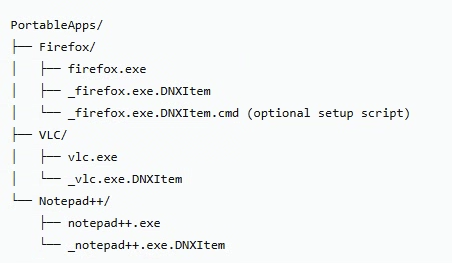
KEY FEATURES:
- Recursive scanning of .DNXItem files
- Visual editor with icon preview
- Complete integration with Windows context menu
- Advanced categorization system based on folder structure
- Automatic execution of associated scripts (.cmd, .reg)
- Modern interface and persistent configuration
PRACTICAL USE CASE: WINDOWS REINSTALLATION
The Problem:
- After reinstalling Windows, you face:
- Hours reinstalling applications
- Lost configurations and settings
- Manual recreation of Start Menu shortcuts
The DNXPSoft Solution:
BEFORE REINSTALLATION:
- Organize all portable applications in your preferred structure
- Create .DNXItem files for each application
- Backup your portable applications directory
AFTER REINSTALLATION:
- Install DNXPSoft (single executable)
- Restore your portable applications directory
- Run DNXPSoft and process your applications
- All Start Menu shortcuts are restored in minutes!
Time Comparison:
- Traditional Method: 2-4 hours reinstalling applications
- DNXPSoft Method: 5-10 minutes restoring shortcuts
* Time depends on the size of your installation directory.
THE BIG PICTURE
DNXPSoft transforms the way you think about software management. Instead of treating applications as permanent installations, you manage them as portable assets that can be organized, backed up, and restored with unprecedented efficiency.
The ultimate goal: Make Windows reinstallation a 15-minute process instead of a half-day ordeal.
With DNXPSoft, your applications become mobile, organized, and instantly available - transforming software management from a chore into a streamlined process.
PERFECT FOR:
• Users who work with portable applications
• Anyone who wants to organize applications without installing them
Main Interface

Main view with scanner and installation progress

Start Menu after program process a directory.
DNXItem Editor
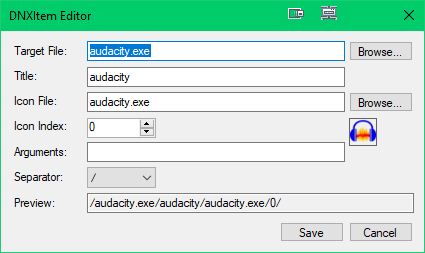
Visual editor with icon preview and configuration
Settings Panel
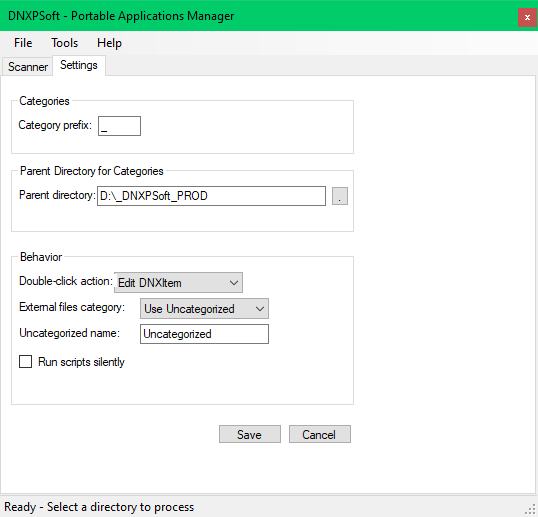
Advanced configuration with Parent Directory
Context Menu

Integration with Windows Explorer context menu
.DNXITEM FILE FORMAT
[separator][target_file][separator][title][separator][icon][separator][icon_index][separator][arguments]
Example: /chrome.exe/Google Chrome/browser.dll/0/--incognito
RELEASE NOTES
CURRENT VERSION: 2.0 (C# Rewrite)
• Complete rewrite from CMD to C#
• Modern graphical interface
• Improved categorization system
• Better error handling
• Persistent configuration
LINKS
GitHub Repository Original CMD Project: https://github.com/Deen0X/DNXPSoft
itch.io Page: https://dnxprojects.itch.io/dnxpsoftgui
LICENSE
Free to use for personal purposes.
### 💖 Support the Project
If you liked this game, consider supporting its development:
[Donate via PayPal](https://www.paypal.me/Deen0XEOL)
Download
Install instructions
INSTALLATION INSTRUCTIONS
- Download and run DNXPSoftGUI.exe
- The application will request administrator permissions (required for registry)
- Go to Tools → Register Context Menu to integrate with Explorer
- Ready! You can now use the context menu on any file
HOW TO USE
Basic Workflow:
- Create DNXItem: Right-click any .exe → "Generate DNXItem"
- Edit: Right-click .DNXItem → "Edit DNXItem"
- Process: Right-click .DNXItem → "Process DNXItem"
- Process All: Right-click .DNXItem → "Process all DNXItems"
From the Application:
- Use the Scanner to process complete directories
- Configure Parent Directory in Settings for automatic categorization
- Customize behavior in Settings
Leave a comment
Log in with itch.io to leave a comment.